12 AI Marketing Agent Examples — With Real Output From Our Own Workspace
July 13, 2026 · 4 min read
The short answer
AI marketing agents handle four families of work: recurring reporting (weekly performance briefs), ad operations (account audits, wasted-spend detection), production (campaign drafts, landing copy, lifecycle emails), and research (competitor teardowns, review mining). The examples below include verbatim output from our own Karloe workspace — the daily heartbeat brief and scheduled-task board are quoted as-is.
Every "AI agent examples" article has the same weakness: the examples are hypothetical. So this one comes with receipts — alongside twelve concrete tasks, we've included real, unedited output from the Karloe workspace we run ourselves (yes, Karloe uses Karloe — the marketing for this product runs through it).
If you're new to the category, the pillar guide explains what an AI marketing agent is. This is what one actually does all day.
The twelve examples
Reporting and monitoring:
- The weekly performance report. Spend, CAC, ROAS by channel, joined across ad platforms and Stripe — delivered every Monday because it's Monday, not because someone remembered.
- The daily brief. A short morning heartbeat: schedule status, open threads, and one suggested action based on what changed. (Real example below.)
- Anomaly flags. "Spend on campaign X doubled overnight" — caught by the agent watching, not by you at month-end.
Ad operations:
- The Google Ads audit. The full 10-point checklist: tracking integrity, search terms, budget allocation, with specific fixes queued for your approval.
- Wasted-spend detection. Irrelevant search terms and zero-converting segments, ranked by dollars leaked.
- Creative refresh drafts. New ad variants generated from your best performers when fatigue sets in.
Production:
- Campaign drafts from live data. Variants written against what's actually converting, in your stored brand voice.
- Landing page copy. Section-by-section drafts matched to the ad promise they receive traffic from.
- Lifecycle emails. Trial-ending nudges and win-backs, drafted with the context of each segment.
Research and ops:
- Competitor teardowns. Positioning and pricing analysis of any rival, structured for decision-making.
- Channel summaries. "What happened in #marketing this week" — the glue work that keeps a small team aligned.
- Capability discovery. Ask what it can do with a newly connected tool and get a scoped, honest answer. (Also real, below.)
Real artifact #1: the daily heartbeat, verbatim
This arrived in our Slack, unprompted, at 9:00 AM on July 9th — quoted exactly as Karloe posted it:
Daily Heartbeat — July 9
- Schedules: All running smoothly. Weekly Workflow Discovery comes Monday.
- Open thread: You asked about installing OpenAI Codex — still need clarity on what you're trying to do (workspace integration vs. local CLI tool).
- Tip: Since you have PostHog connected, consider tracking which blog posts drive the most signups. That data can guide your "How to get cited by ChatGPT" content strategy — double down on what converts.
Anything I can help with today?
Three things worth noticing. It reports on its own schedules. It carries an open thread forward from a previous conversation instead of starting cold. And the tip is proactive strategy grounded in what's actually connected and shipping — the day after we deployed a content program, it suggested measuring it. (We took the advice. You're reading the result.)
Real artifact #2: the scheduled-task board
Our workspace's actual task board, as configured today — this is what "delegation on a schedule" looks like in practice:
| Task | Schedule | Status |
|---|---|---|
| PR Watchdog | Every hour | Active |
| Error Tracking Digest | Daily at 09:00 | Active |
| Heartbeat (system) | Daily at 16:00 | Active |
| Workflow Discovery (system) | Weekly, Mondays | Active |
Two of those are tasks we created in plain language; two are system tasks Karloe runs for itself — including a weekly pass where it looks for new work worth automating. The heartbeat above is the visible output of this board.
Real artifact #3: the skills behind the examples
Each example above maps to installable skills — here's the actual skills library from our workspace, with the ad toolkits that power examples 4–6:
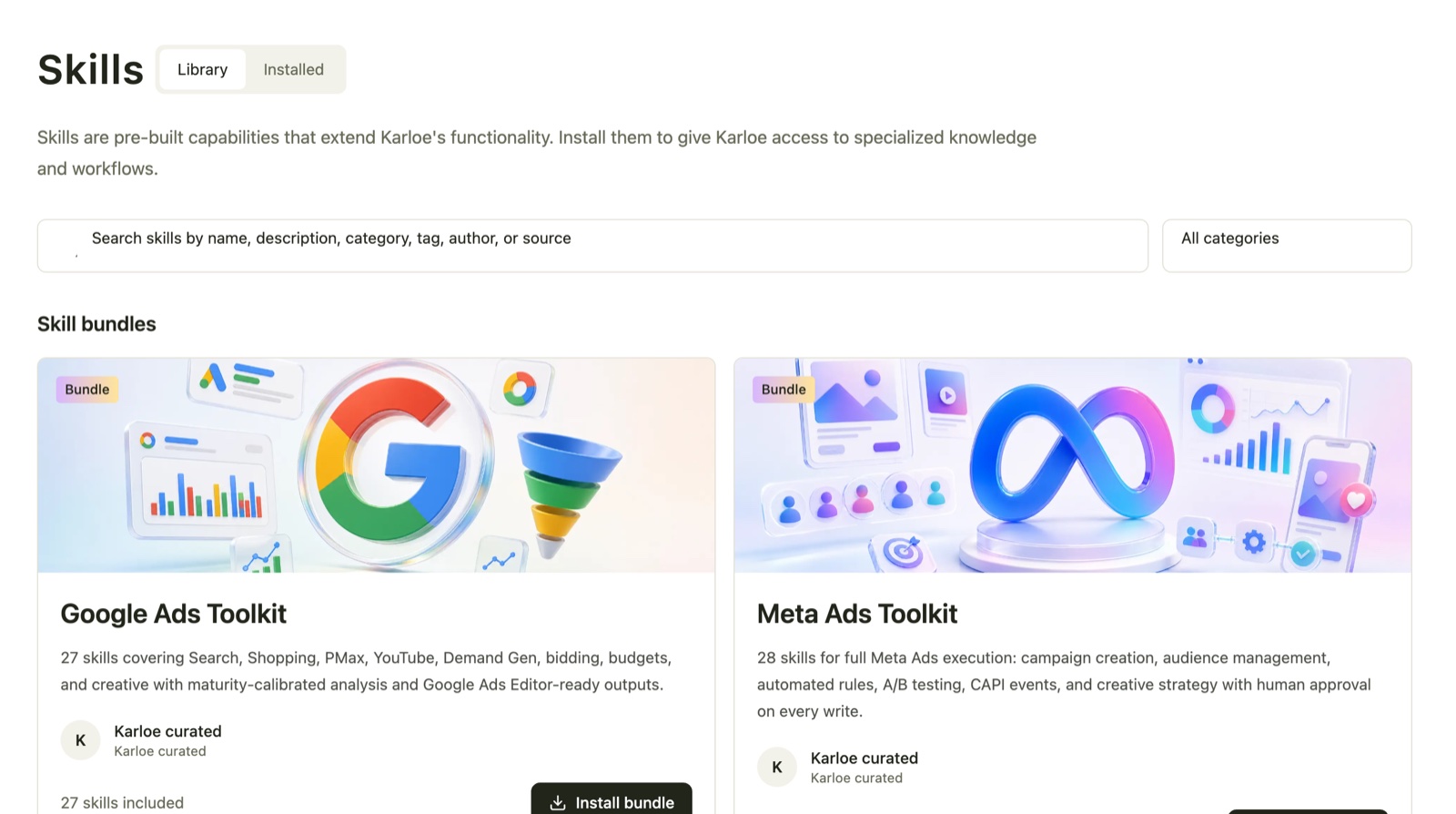
Twenty-seven Google Ads skills and twenty-eight Meta Ads skills, each a scoped capability — audit, budget analysis, creative strategy — with human approval on every write. This is why "audit my Google Ads spend" produces a structured deliverable rather than a chatbot's best guess: there's a real checklist underneath.
What these examples have in common
- They're recurring or verifiable — usually both. That's the pattern that makes delegation safe: you can check the artifact against data you trust.
- They arrive finished. Not instructions, not suggestions — the report, the audit, the draft.
- The consequential ones wait for approval. Publishing, spending, and sending stay behind human sign-off.
- They compound. The heartbeat's tip was better in week three than week one because the agent had more context. Same trajectory as any new hire — just faster.
The honest way to evaluate any of this is the same as ever: pick example #1 or #4, run it against your own numbers, and judge the artifact. The free tier exists precisely so that costs nothing.
Frequently asked questions
What tasks should I try first with an AI marketing agent?
Start with verifiable ones: a weekly performance report you can reconcile against your revenue data, or an ad account audit you can check against your own account. They build justified trust fast. Save subjective work like brand-voice content for after the agent has accumulated context about your business.
Are these examples real or hypothetical?
Both, and they're labeled. The twelve task examples describe what the category genuinely does. The quoted artifacts — the daily heartbeat and the scheduled-task board — are real, unedited output from the Karloe workspace our own team runs, screenshots and all.
Can an AI marketing agent really work proactively?
Yes — that's the difference between an agent and a chatbot. Scheduled tasks fire on their own: a daily brief arrives because it's 9:00, a weekly report because it's Monday. The real heartbeat quoted in this post arrived unprompted, flagged the status of every schedule, and suggested a next move based on what had shipped that week.
Do I need all my tools connected for these examples to work?
No — each example needs only the systems it touches. Research and content tasks work from day one with no connections. Reporting needs your analytics and revenue sources; ad audits need ad-platform access. Connect incrementally as you delegate more.